How an MLS Client Portal Keeps Real Estate Communication Connected to Current Listings
Use client portal MLS, listing alerts, and inquiry dashboard MLS to keep client communication connected to current property data.
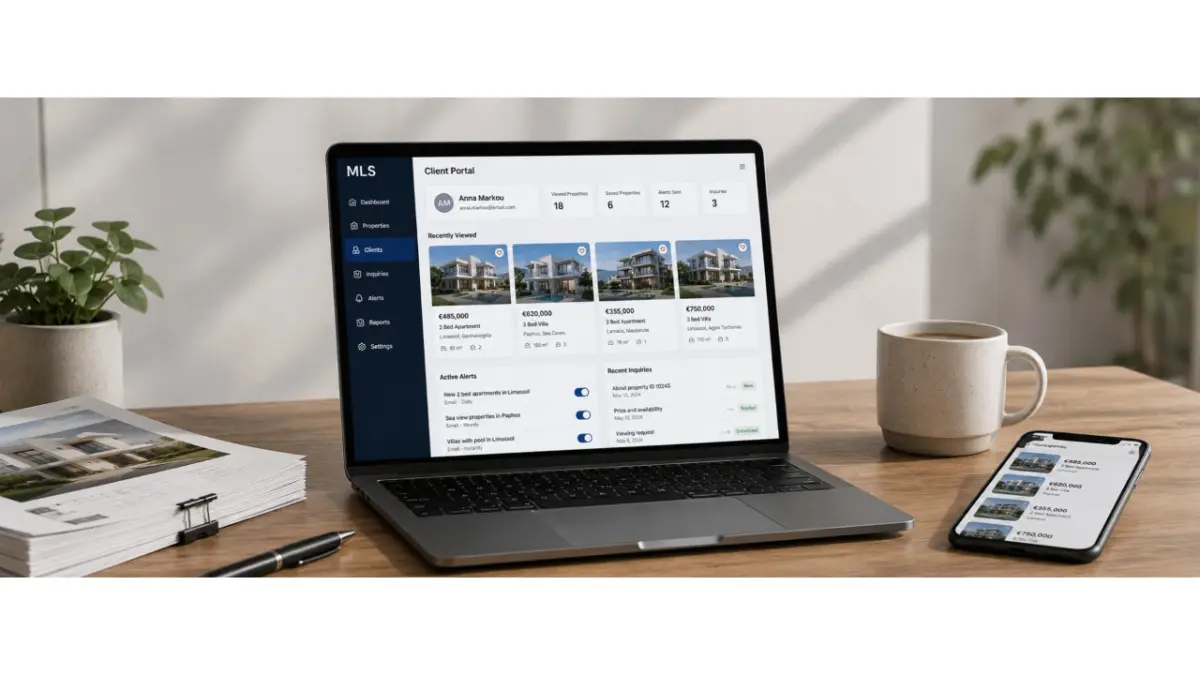
Client communication becomes harder to manage when every interaction sits apart from the property data the team uses. An agent has to reconstruct the context: which listing was shared, what interested the client, where a question came from, and whether the details have changed since the last message. A client portal in an MLS can bring property selections, client feedback, and follow-up into one connected workflow.
How private client access works
A client portal gives a client a private place to review properties selected for them. Depending on the platform, they may be able to revisit options, save listings, leave feedback, or ask a question about a particular property.
For the agent, the useful part is context. If a client prefers one apartment and dismisses another, that reaction can stay connected to the relevant listings. The next conversation can begin with what the client has already seen instead of starting the search again.
Why a portal works better than manual sharing
When an agent sends property details through separate files and messages, clients may return to an old price or ask about a unit whose status has changed. The agent then has to establish which version the client saw and explain what is current.
A portal can keep the client’s selection connected to maintained property records. It still depends on the team updating those records promptly. When the data is current, the client and agent have a clearer starting point for the next conversation, even if several days have passed since the property was first shared.
How clients receive new matching options
A saved search can help an agent remember a client’s criteria, such as location, budget, property type, and size. Where listing alerts are available, new or changed properties that match those criteria can be brought to the client’s attention.
The criteria need to be specific enough to make each update useful. Broad alerts can become noise, while relevant options give the agent a reason to restart the conversation with a clear next step.
How notifications reduce manual work
Notifications can reduce the need to prepare the same update separately for each client. Depending on the platform’s available features and the client’s preferences, a matching property or relevant change may be shared through an email or a mobile notification.
A notification is useful when it leads back to the property information the team maintains. Email listing alerts can give clients time to compare options, while mobile notifications may suit shorter updates. The agent still needs to answer questions, verify important details, and guide the decision.
How teams avoid losing client questions
A question in a long message thread can be difficult to trace back to the right property. If a client is comparing several apartments, “Is this one still available?” is not enough context on its own.
Connecting an inquiry to a property card helps the agent understand what the client means and what needs checking. Property inquiry management also requires clear responsibility: the team should know who will answer, whether confirmation is needed, and what follow-up has been promised.
What the team manager can see
A manager needs to know whether client questions are being handled, where responses are delayed, and whether any follow-up has been left without an owner. A shared view of inquiries can make those gaps easier to identify than private messages alone.
Where an MLS inquiry dashboard is available, it can support this review by showing inquiry status and next actions. The manager’s task is then to resolve delays and help the team give clients accurate answers.
Why this matters for real estate teams in Cyprus
In Cyprus, agents may manage several buyers across different areas, projects, and property types at once. Property details can change while clients are still comparing options. If the selection, client reaction, and follow-up are kept separately, the agent must repeatedly rebuild the conversation.
A client portal can give those interactions a more organised place. Its value depends on current listing records, clear team responsibilities, and useful communication with the client.
How a portal supports deal speed
When a client’s interest is connected to a specific property, the agent can see what needs attention and respond with more context. A saved option may call for an availability check; a question about payment terms may need confirmation from the developer; a rejected property may help narrow the next selection.
The portal does not make those decisions for the agent. It helps keep the property, the client’s response, and the next action together so the conversation can continue without searching through old files and messages.
Frequently asked questions
What is a client portal in an MLS?
It is a private space where a client can review selected properties and, depending on the platform, save options, provide feedback, or ask questions connected to listings.
How is a portal different from sending regular property links?
A portal can keep a selection and related client activity together. Its property details are useful only when the underlying listing records are maintained and updated.
Why do clients need property alerts?
Relevant alerts can bring new or changed matching properties to a client’s attention. Their value depends on accurate listing data and carefully chosen search criteria.