Importing and Exporting MLS Data for Real Estate Teams in Cyprus
Use Excel upload listings, bulk updates, and data export MLS to move property records into MLS, clean stock, and keep reports accurate.
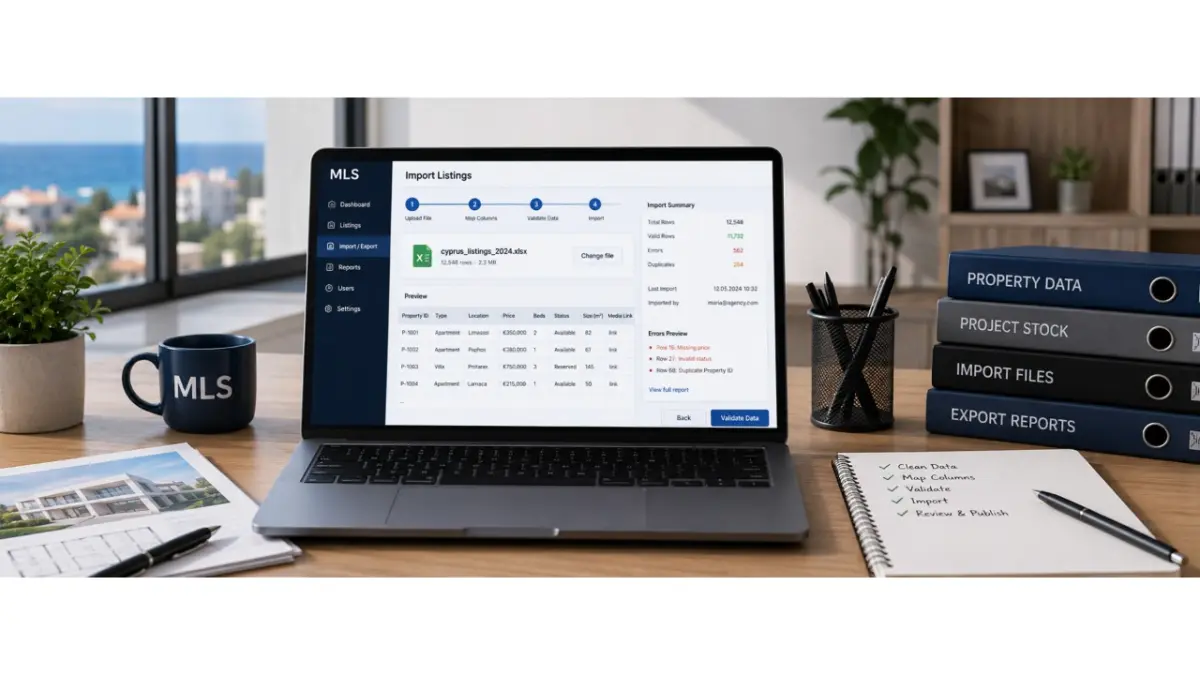
Real estate teams in Cyprus often have property data spread across spreadsheets, older databases, CRM exports, PDF brochures, Drive folders, WhatsApp messages, and email threads. As inventory grows, entering every property, unit, price, status, and media link by hand becomes slow and difficult to manage. CSV import for listings offers a way to turn existing records into structured MLS data that teams can search, update, check, and share.
Where property data usually comes from
Before importing anything, the team needs to collect the sources that already contain property information. An agency may have spreadsheets from different agents. A developer may have a project file with units, floors, sizes, prices, and availability. A larger company may work from an older database or CRM export.
The first decision is which information is current and which records should no longer be used. Old prices, repeated properties, missing details, inconsistent area names, outdated statuses, and broken links should be reviewed before import. Otherwise, the team moves the same confusion into a system that more people will depend on.
How to prepare a spreadsheet for upload
A spreadsheet should be easy for both the team and the receiving system to understand. Each column should have one purpose, such as price, status, location, size, floor, property type, media link, document link, or internal note. A cell that combines an old status, a manager’s comment, and buyer-facing details will be difficult to map correctly.
For an Excel upload of listings, the file should be cleaned and prepared for import rather than copied directly from an old working sheet. Use consistent status names and price formats, make locations clear, and give each property or unit its own record. This reduces corrections after upload and helps users understand what the imported data represents.
What to check during upload
Imported records should be reviewed before agents, brokers, or other users rely on them. The team needs to identify missing required fields, possible duplicates, incorrect price formats, unmatched locations, and media links that no longer work.
A controlled MLS data import follows four practical steps:
- Upload the file in a supported format.
- Match spreadsheet columns to the appropriate MLS fields.
- Review errors, missing information, possible duplicates, and broken links.
- Approve the records that are ready to become working inventory.
The aim is to create usable property records, not simply to fill the platform with imported rows. The exact validation and approval steps depend on the import tools available.
How large stock updates should be handled
The first import is only the beginning. Units are reserved, prices change, photos are added, and documents are replaced. If the team has to repeat every change manually across a large inventory, records can fall behind.
A bulk listing update can help when many records need to change at once. A developer may revise availability across a project, while an agency may correct statuses after an inventory review. Before applying an update, the team should identify which existing records it will change and review any rows that cannot be matched. This helps prevent an update from creating duplicate units or overwriting correct information.
Why teams still need controlled exports
Once inventory is structured, teams may need to use selected data outside the MLS for reporting, internal reviews, analytics, or approved sharing. An export should serve a defined task. It should not become a second working spreadsheet where live prices and statuses are changed without updating the main record.
In a controlled MLS data export workflow, a manager might review properties with missing details, or a developer might examine availability across a project. The exported file is a snapshot for that purpose. Users should understand when it was created and avoid treating it as a live source after the underlying records change.
How to protect data quality
Poor imports create problems that appear later in sales work. An agent questions whether a price is current. A broker sees an outdated status. A manager finds two versions of the same property. A coordinator cannot tell which record to correct.
A useful import process includes field matching, checks for missing or inconsistent values, review of possible duplicates, and a chance to inspect records before they are put into use. Teams should also assign responsibility for preparing the source file, resolving questionable records, and approving the resulting inventory. These responsibilities matter when data comes from several people or older systems.
What changes after a clean import
After a clean transfer, agents can search structured records instead of rebuilding property details from scattered files. Developers can maintain project inventory more consistently, and managers can identify records that need attention.
For Cyprus real estate teams, the lasting benefit depends on what happens after import. Prices, availability, media, and documents still need clear owners and regular updates. Import establishes the working inventory; ongoing data care keeps it useful when a buyer or broker needs an answer.
Frequently asked questions
What does CSV import mean in MLS software?
It means transferring property records from a structured CSV file into an MLS rather than entering each record separately. Columns are matched to the relevant listing fields, while rows represent properties or units according to the chosen import structure.
When should a real estate team use Excel upload instead of manual entry?
It can be useful when a team needs to move or update many properties or units. The file should be cleaned first, and the platform’s supported formats and import process should be checked before upload.
What should be cleaned before importing property data?
Review duplicate records, old prices, unclear statuses, inconsistent locations, missing fields, broken links, and information that no longer belongs in the active inventory.