MLS API for Cyprus Real Estate Teams
Learn how MLS APIs connect websites, CRM systems, IDX feeds, dashboards and listing data for cleaner real estate workflows in Cyprus.
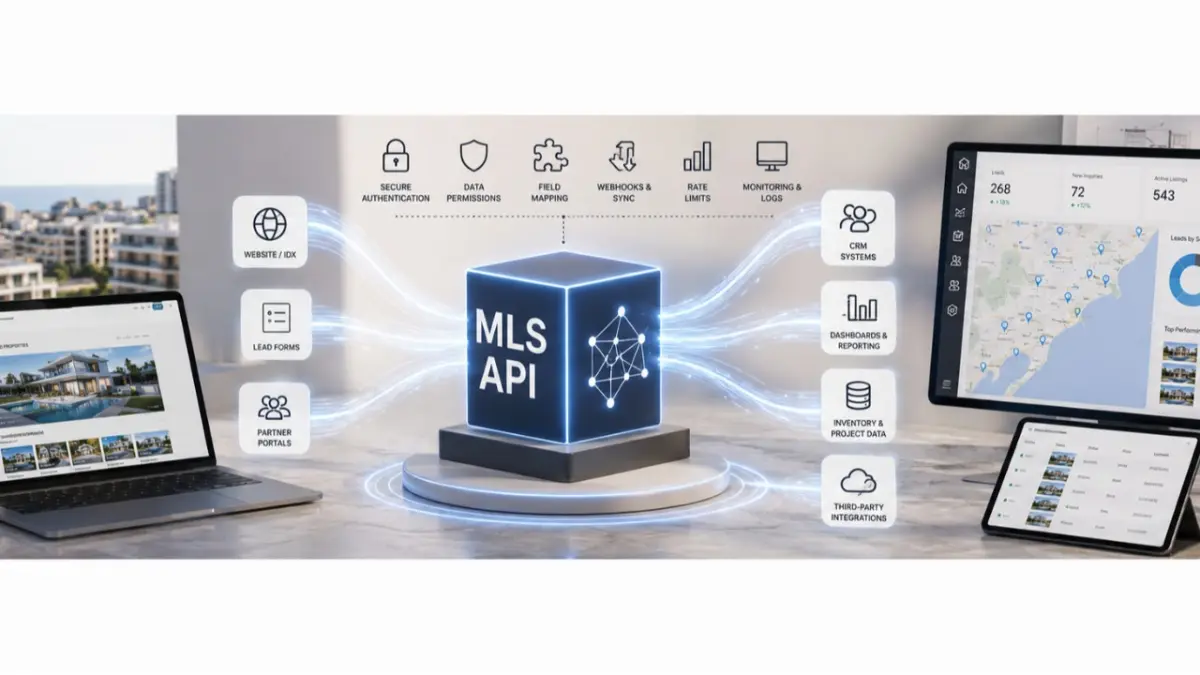
As an agency or developer team grows, property information begins to move between systems. Listings appear on websites, inquiries enter a CRM, project pages need updates and managers review activity elsewhere. Copying the same details into each place takes time and creates conflicting versions.
An MLS API provides a way for systems to exchange selected data. Its value depends on the rules behind that exchange: which system owns each field, who may access it and how the team discovers an update that has failed.
What an MLS API Does
An API is a software connection between systems. In a real estate workflow, it may allow approved listing or project information to move from an MLS to a website or another operational tool.
The connection needs a defined scope. A team should decide which property fields are shared, which system controls prices and availability, and whether changes move in one direction or both. API access does not mean every field is available to every connected system.
Keep Website Listings Aligned with Inventory
A website can use connected property data instead of relying entirely on manual page updates. The aim is to reduce the gap between a change to the working property record and what a visitor sees online.
That still requires careful setup. A unit’s status must map to the right website label. Images and descriptions must be approved for public use. The team also needs a process for handling a failed update so an unavailable property does not continue to appear available without anyone noticing.
Understand the IDX Display Layer
IDX integration concerns how permitted MLS listings appear on a real estate website. Buyers may experience it as listing cards, search results or property pages. Behind that display are decisions about which records may be shown and which details remain private.
A website connection should be assessed against the team’s publishing rules. The presence of an MLS record does not automatically mean the whole record should be made public.
Connect Inquiries with Property Context
When a buyer submits a website inquiry, the sales team needs to know which property prompted it. If a form sends only a name and phone number to the CRM, the agent may have to reconstruct the conversation before responding.
A CRM and MLS integration can pass the relevant listing or project reference alongside the inquiry when the systems support that workflow. The team can then assign the request, check current availability and answer with useful context.
Personal information needs its own rules. Teams should decide which buyer fields are necessary, who can see them and whether the CRM or another system owns each part of the contact record.
Plan Extensions Around Real Work
One team may need a website feed; another may need to connect project inventory with an internal system. These are different integration projects, even if both use an API.
Separate connectors or modules can make those projects easier to organize. Before choosing an approach, the technical and sales teams should agree on the business task: what data must move, why it must move and who will maintain the connection. There is little value in adding a module that no one owns after launch.
Check the Details Before Building
An integration plan should answer several practical questions:
- Which system is the source of truth for each field?
- Which listings and documents may the connected system access?
- How are property records identified across systems?
- What happens when a unit is reserved or a price changes?
- How will the team detect and correct failed updates?
- Who can approve access, and how will unused access be removed?
- Which team handles support after launch?
Testing should include ordinary sales situations. Change a unit’s status, update a price and submit a website inquiry. Then check what appears in each connected system and what the agent receives.
Keep Product Scope Clear
MLS RealtyHub offers a structured environment for property and project information. Custom APIs, feeds and website integrations need to be assessed for the specific team and its access requirements. The exact data fields, update frequency and technical arrangements should be agreed before implementation.
An API can reduce repeated data entry. It cannot correct inaccurate source records or replace responsibility for reviewing what buyers and agents see. The strongest integration has a clear owner, a defined data flow and a way to spot errors before they interrupt a sales conversation.
Frequently asked questions
What is an MLS API?
It is an interface that lets an MLS exchange permitted data with another system, such as a website or CRM. The information shared depends on the agreed integration and access rules.
Can an MLS API guarantee instant updates?
Not by itself. Update timing depends on the systems and the way the integration is built. Teams should confirm the expected timing and test how failures are detected.
What should a team decide before connecting its CRM?
Decide which system owns contact and property records, what context an inquiry needs, who can access buyer data and how duplicate or failed transfers will be handled.