By Wednesday morning, Myrto had stopped trying to reconstruct the journey of the original PDF. Two days had already shown her enough. First, the private price had reached agents who were never invited to the pre-sale. Then the same offer began appearing through different brokers, weakening the sense that there was anything genuinely limited about the launch.
The next private release was due in a few days. Eight more units from the same development were going to become available, and under the old process the team would have prepared another presentation, exported another price list and sent both files to a selected group with the same familiar request: Please do not forward.
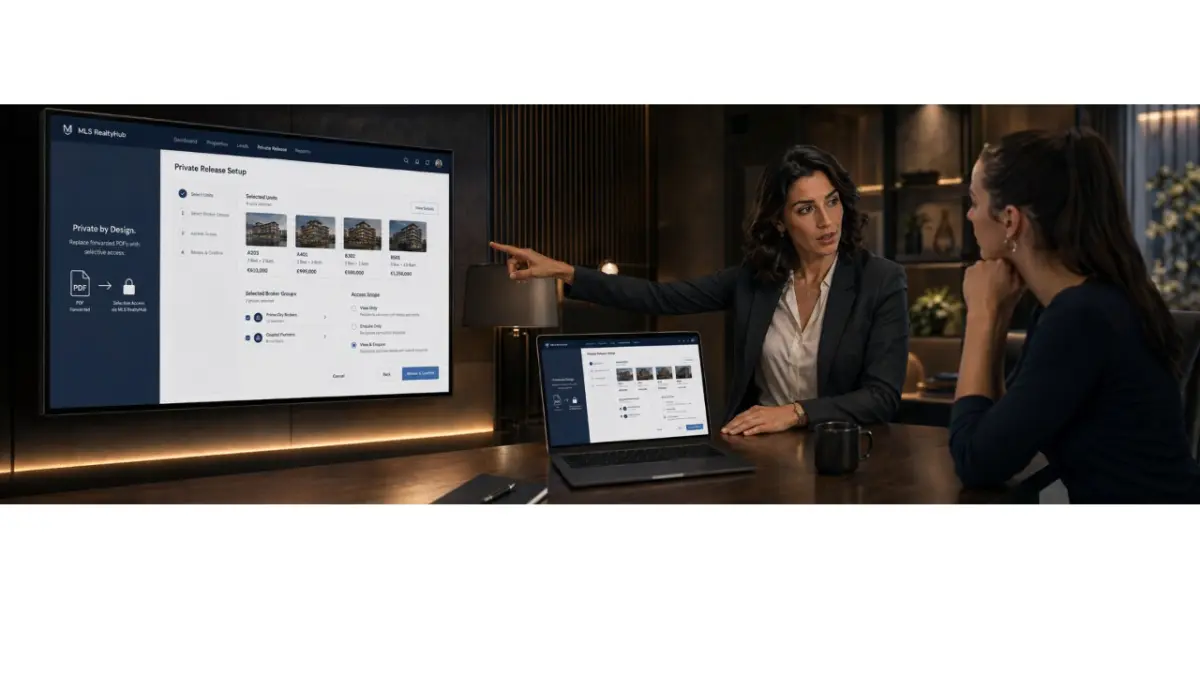
This time, Myrto opened the project in MLS RealtyHub.
“We’re not doing the same thing again,” she said.
The sales manager pulled up a chair.
“No PDFs?”
“That’s not the point. A PDF can still exist. I just don’t want the file itself to be the access.”
He looked at the screen.
“So what should control the access?”
“The person,” Myrto said. “A specific broker should be allowed to see a specific offer. That’s what we need to manage.”
For the first time that week, the team was no longer discussing how to contain information after it had already been sent. They were deciding how the next release should be structured before anyone saw it.
This time, they started with the audience
Myrto opened the private stock for the project in MLS RealtyHub. The first decision was not which presentation to send, but which brokers should be included in the new release.
“How many are we giving access to?” the sales manager asked.
“Nine for the first group.”
“The same people as Monday?”
“Not all of them. Remove two and add three from the international team.”
He made the changes.
“One group?”
Myrto looked through the names again.
“No. Split them. International buyers in one group. High-budget local clients in another.”
“So the same development, but two different audiences?”
“Exactly.”
The distinction mattered. On Monday, the team had also started with a list of names, but that list was only a mailing list. It showed who received the PDF first. It did not define who could continue accessing the private offer once the file started moving.
In MLS RealtyHub, the selected brokers or broker groups formed part of the private release itself. The team was no longer simply choosing who should receive a document. It was choosing who should be included in the access workflow.
The manager finished setting up the first group.
“Done.”
“Show me the audience again.”
He opened it.
“Nine brokers.”
Myrto nodded.
“That already tells me more than Monday’s spreadsheet did.”
“How?”
“That spreadsheet told us who we sent something to. This tells us who we’re actually opening the release to.”
The Wednesday product flow in the Week 9 plan is built around exactly this shift: from a forwarded file to selected access, where the developer chooses specific brokers or groups before defining what private stock they can see.
The next decision was not who, but what
The new release included eight units, but Myrto did not want every broker to see all eight.
Four apartments were better suited to international buyers. Two higher-value units were being reserved for brokers working with local high-net-worth clients. The remaining stock was not yet meant to be part of this stage of the launch.
“Open Units 504, 506, 611 and 702 to the first group,” Myrto said.
The manager adjusted the scope.
“And the other four?”
“Not yet.”
“Even though some of these brokers already know those units exist?”
“Knowing the project exists and having access to a private offer are two different things.”
He opened the view for the first group.
“They can see these four units, the current prices and the materials attached to them.”
“What about 708 and 710?”
“They’re outside this group’s scope.”
“Good. Now show me the second group.”
The second audience had a different selection.
Myrto leaned closer to the screen.
“This is what we were missing.”
“What?”
“We kept treating the project as either private or public. But what we actually need to control is who sees which part of the stock.”
Under the old workflow, a PDF determined the scope. If eight private units were inside the document, everyone who received the file saw all eight. Once it left the developer’s hands, the team had no meaningful way to decide which part of that offer would be shown next.
With selective publishing in MLS RealtyHub, audience and scope became separate decisions. The developer could choose the brokers or group first, then determine which project information, units, prices, terms and assets were available to them. The Week 9 plan defines access scope in exactly those terms: private access is not limited only by who is invited, but also by what each recipient is allowed to see.
The sales manager looked at the two groups.
“So we’ve been confusing a private project with private stock.”
“Pretty much.”
“And now the project can be known, while specific offers stay restricted?”
“That’s the point.”
For the first time, the team could check access instead of relying on memory
Once both groups were configured, Myrto asked to see the current access setup.
“First group?”
“Nine brokers.”
“Second?”
“Six.”
“And we can see what access has been given to each group?”
“Yes.”
That was more important to her than the interface itself. Under the old system, knowledge about a private launch was scattered across spreadsheets, WhatsApp conversations and the memories of individual sales managers. One person remembered who had received a new price. Someone else knew which broker had been shown an extra unit. A week later, the team could easily lose track of which version had gone where.
Inside MLS RealtyHub, the audience, the selected stock and the access history sat within the same product workflow. The purpose of access history in the content plan is not to promise perfect surveillance, but to give the team visibility and a basis for follow-up. Selective publishing, meanwhile, is defined as opening specific stock to selected brokers or groups rather than distributing the same file broadly.
“What if one of these brokers shouldn’t be in the release tomorrow?” Myrto asked.
“We change the access.”
“We don’t message them asking them to delete yesterday’s presentation?”
“No.”
“And we don’t create Final_Private_v3?”
The manager smiled.
“Also no.”
“Progress.”
The first real request tested the new workflow
Around lunchtime, one of the brokers in the first group contacted the sales team.
“He’s asking about Unit 708,” the manager said.
Myrto looked up.
“Can he see it now?”
“No. It’s not part of his scope.”
“How does he know about it?”
“He heard about the unit during the project presentation. He says he now has a specific buyer for it.”
Under the previous system, the response would have been predictable. Someone would send a page from the price list, a screenshot or an updated presentation. Within seconds, another independent copy of private information would exist outside the original release.
“Is the buyer serious?” Myrto asked.
“He says they’re ready to discuss a reservation.”
“Check the budget and timing first.”
A little later, the manager came back.
“Qualified buyer. Budget fits.”
“Then give him access to 708.”
“To the whole group?”
Myrto shook her head.
“Why would we expand the offer for everyone because one broker has a relevant buyer?”
He made the adjustment in MLS RealtyHub.
“Done.”
“He can see Unit 708 now?”
“Yes.”
“And the other brokers in his group?”
“No.”
Myrto looked at the screen for a moment.
“That is what I mean by selective.”
It was a small operational change, but the logic was completely different. Instead of creating another document for a single request, the team changed the scope of access. The unit did not suddenly become available to everyone else just because one broker had a reason to see it.
The content plan describes the Wednesday product story in exactly this way: private stock is opened to selected brokers or groups, specific units are included in the offer scope, and access can be changed as the release develops.
A change in the offer no longer meant another round of files
Later that afternoon, the team received an update on one of the units. Only part of the offer had changed, but under the previous workflow even a small change would have triggered another round of documents and messages.
“What would we have done with this on Monday?” Myrto asked.
The manager already knew where she was going.
“Exported a new PDF.”
“Then?”
“Sent it to everyone again.”
“Then?”
“Told them to ignore the previous version.”
“And then?”
He laughed.
“Someone would probably still send the old price to a client.”
Myrto nodded.
The problem with file-based private distribution was not only forwarding. Every update created another copy of the market. Old files remained on phones, in email threads and inside agency chats, while the developer tried to persuade everyone that a newer version had replaced them.
The new workflow was different. The team was managing private stock and access to that stock through MLS RealtyHub, rather than generating another independent version of the offer every time something changed.
For Myrto, that was when selective publishing stopped sounding like a software feature and started feeling like an operating process. The developer was no longer chasing documents that had already left the company. It was managing what selected brokers were supposed to have access to at that stage of the launch.
That shift is central to Week 9: the old workflow moves from Developer → Confidential PDF / WhatsApp → selected broker → forwarding or screenshot → unknown recipients, while the new workflow moves through MLS RealtyHub Private → selected brokers or group → selected units and scope → access history → changes to future access.
Then came the obvious question
Near the end of the day, the sales manager checked the two broker groups one more time.
“This is definitely better than sending the PDF.”
“But?”
He hesitated.
“What stops a broker from taking a screenshot?”
Myrto looked at him.
“Nothing makes screenshots physically impossible.”
“Or from telling a buyer the price?”
“Of course they can tell a buyer.”
“So we still don’t control everything.”
“No.”
He seemed surprised by how quickly she answered.
“And you’re fine with that?”
“I’m fine with not pretending that the word Confidential gives us absolute control.”
She closed the project screen.
“Today we solved a different problem. We decided who we open private stock to and what we allow them to see. Screenshots are a separate question.”
“So tomorrow?”
“Tomorrow.”
Myrto was not interested in replacing one false sense of security with another. MLS RealtyHub was not supposed to make information impossible to copy, and the Week 9 rules explicitly say not to make that promise. Controlled access is about a known audience, limited scope, access history and the ability to change future access when necessary.
The Takeaway
Myrto’s Wednesday changed the private launch at its starting point. Instead of sending the same confidential file to a list of people and hoping its boundaries would survive, her team used MLS RealtyHub to decide which brokers or groups were part of the release, which units and terms each audience could access, and how that access should change as the launch developed. Selective publishing does not make private information impossible to copy, but it gives the developer something a forwarded PDF never could: a defined audience, a limited offer scope and a manageable access process. A private pre-sale stops depending on the behaviour of a document and starts depending on rules the developer can actually set.
Author
This material was written by Maria Vashchenko.
For questions, collaboration, or further discussion, feel free to contact me on LinkedIn.