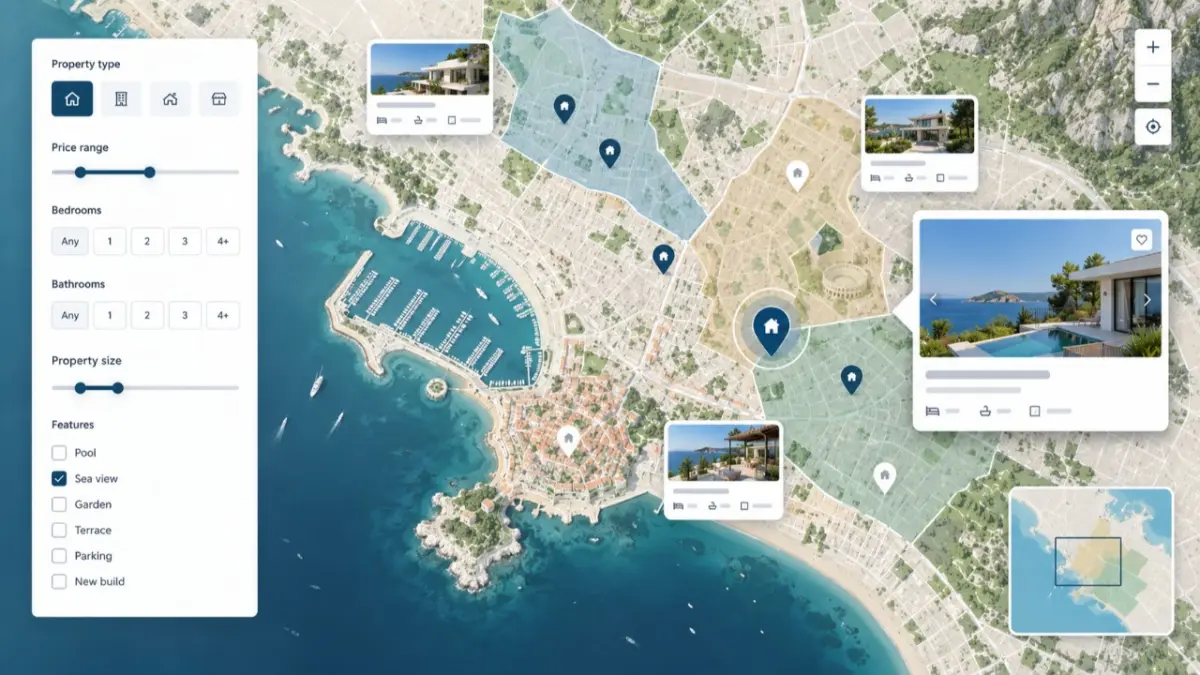
Find property listings through location, not just a long results list. Property Map Search gives real estate professionals a spatial view of available listings inside MLS RealtyHub, so they can focus on a relevant area, refine what appears there, and move from market context to an individual property.
A List Cannot Answer Every Location Question
A standard list works when the user already knows exactly what to search for. It is less useful when the request begins with an area: a buyer wants to stay near a particular neighbourhood, an agent needs to understand what is available around a viewing route, or a professional wants to examine a defined part of the market. Addresses may look close in a list while belonging to very different surroundings.
Property Map Search adds the missing spatial context. Instead of comparing property names and addresses as separate lines, the user sees listings positioned on a map and can concentrate on the area that matters to the current task. The map does not replace professional review; it helps the user decide which records deserve that review.
What Property Map Search Does
Property Map Search is a live tool within the Search, Maps and Discovery area of MLS RealtyHub. It displays property listings through a map-based interface, with property results presented alongside location points and filters suited to the content on that screen. Its job is specific: help a professional narrow a broad pool of listings by both place and property criteria.
This is an internal B2B search experience for real estate professionals. It is not the consumer search used by RealtyHub.cy or Realty.com.cy, and it is not a public property portal. The tool supports work inside MLS RealtyHub, where the user can examine accessible property records in a professional context.
Who Uses the Map and When
The primary user is an agent preparing options for a client. The tool is useful when location is part of the brief and a text-based result set is too broad to interpret quickly. Developer users and other authorised professionals can also use the same map interface to review property supply in a selected area, but project search remains a separate task.
Use Property Map Search when you need to:
- explore listings around a location rather than search by a property name alone;
- reduce a broad set of results with criteria relevant to the property search;
- see how individual listings are distributed across the visible map area;
- move from an area-level view to a property record for closer review.
What You Need Before You Start
The search begins with two practical inputs: the location you want to examine and the property criteria that matter to the request. Those criteria may relate to the characteristics of the property or its location. MLS RealtyHub uses contextual filters, which means the filters shown are designed for the type of content on the current screen rather than being one universal filter set for every entity.
The available fields, default map coverage and access rules may vary according to the user’s account configuration. Users should work with the controls and records available in their accounts. Property Map Search provides access to available property records and does not replace reviewing each listing individually.
How the Search Loop Works
The interaction is deliberate: the user defines the area and criteria, MLS RealtyHub applies them to the map view, and the user chooses what to inspect next.
- Open the property map. Start with the map interface for property listings rather than the separate project map.
- Focus on the relevant area. Move from a broad geographic view to the part of the map connected to the client request or professional task.
- Apply the relevant filters. Narrow the results using the property search criteria available on the screen.
- Review the visible results. MLS RealtyHub presents the matching property listings in the map interface, allowing the user to consider both the records and their locations.
- Choose a listing for closer review. Move from the spatial overview to the property that may fit the request, then continue the normal professional review of its information.
The user controls the area, criteria and choice of result. The system processes those choices by updating which property listings are presented in the relevant map view. It does not make the professional decision, confirm suitability for a buyer or replace verification of the property information.
What the Result Gives You
The immediate output is a narrower, location-aware set of property listings. The map makes distribution visible: the user can see which records fall within the area being examined and avoid treating location as an isolated text field. This creates a clearer handover from discovery to detailed listing review.
The next action depends on the task. An agent may open promising records and compare them against the client brief. A team member may use the map to identify which listings should be checked before a discussion or viewing. In each case, the map produces a working shortlist of possibilities, not a final recommendation or an automatically generated client catalogue.
A Typical Agent Scenario
An agent receives a request for a property in a particular part of Limassol. The brief also includes property requirements, so a city-wide list would contain too many unrelated options. The agent opens Property Map Search, focuses on the relevant part of the city and applies the filters available for the property search.
MLS RealtyHub then presents the matching listings within that map context. The agent reviews where the results sit, opens the most relevant records and checks their information before deciding what to discuss with the client. The tool has completed its role once it turns a broad location request into a manageable set of listings for professional review.
Another Way to Use the Same View
A developer user or another property professional may use the map to examine how accessible property listings are distributed around a selected location. The input and output remain the same: a defined area and relevant criteria lead to a map-based set of property records. If the task is to compare development projects as entities, the separate Project Map Search should be used instead.
How It Fits the Wider Search Process
Property Map Search belongs to the Search, Maps and Discovery area of MLS RealtyHub. That wider area includes global platform search, contextual filters, property and project maps, and location context. Property Map Search should not absorb all of those functions into one page: it is the tool for finding property listings through a spatial interface.
The distinction matters because each search starts with a different question:
- global search helps a user move to accessible content across the platform;
- property map search focuses on individual property listings by area;
- project map search works with projects as a separate entity;
- location context can add information about what is around a property, but it is not the same as selecting listings on the map.
Practical Benefits of a Spatial Search
The value comes directly from the interaction between the map and the available filters:
- A clearer geographic view. Listings are considered in relation to place, not only as rows in a catalogue.
- A more focused result set. The user combines location with relevant property criteria before reviewing records in detail.
- A faster transition to inspection. The map helps the user identify which listings to open next without presenting the result as a final professional judgement.
- A distinct path for properties. Individual listings remain separate from projects, reducing the risk of using the wrong search entity for the task.
These benefits do not depend on claims about perfect matching or complete market coverage. They follow from a simpler mechanism: the user sets the search context, sees property records in that context and decides where to continue.
Scope and Limitations
Property Map Search is a discovery tool, not a routing service, valuation model or GIS analytics product. It supports map-based property search and contextual filtering, but does not provide turn-by-turn directions, travel-time calculations or exhaustive infrastructure coverage. Within that scope:
- results represent the property records accessible through MLS RealtyHub rather than every property available in the external market;
- a point on the map does not by itself verify every detail in the listing;
- the tool does not automatically decide whether a property fits a client;
- property search and project search use separate entities and should not be treated as interchangeable;
- the available filters, account permissions and package access may vary by account configuration.
The map supports the discovery stage. Listing details, commercial conditions, availability and suitability still require the professional checks appropriate to the user’s workflow.
Search Property Listings by Location
See how Property Map Search fits your day-to-day listing discovery process and discuss the access options available for your account.