Importing and Exporting MLS Data for Real Estate Teams in Cyprus
Use Excel upload listings, bulk updates, and data export MLS to move property records into MLS, clean stock, and keep reports accurate.
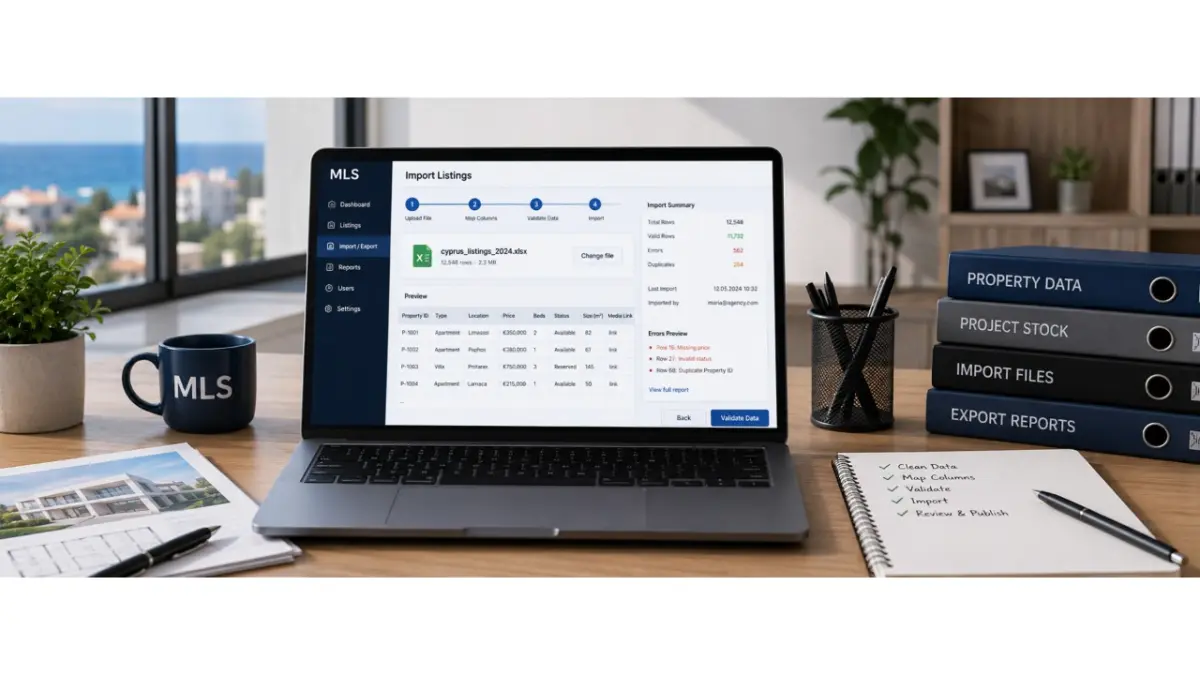
Real estate teams in Cyprus often start with property data spread across spreadsheets, old databases, CRM exports, PDF brochures, Drive folders, WhatsApp messages, and email threads. When the stock grows, entering every property, apartment, price, status, and media link by hand becomes slow and unreliable. For teams moving older inventories into a platform, CSV import listings helps turn scattered property records into structured MLS data that can be searched, updated, checked, and shared through one working system.
Where property data usually comes from
Before anything is uploaded, the team needs to collect the sources that already contain property information. An agency may have spreadsheets from different agents. A developer may have a project file with apartments, floors, sizes, prices, and availability. A corporate team may be working from an old database or CRM export. The important step is not to move everything into the MLS at once, but to decide which data is current and which records should no longer be used.
This preparation prevents the same problems from entering the new system. Old prices, repeated properties, missing details, inconsistent area names, outdated statuses, and broken links should be cleaned before upload. If the team skips this stage, the MLS will not solve the data problem. It will only move the same confusion from spreadsheets into a platform that more people depend on.
Useful checks before upload:
- remove old or duplicated property records;
- separate prices, statuses, addresses, sizes, and media links into clear columns;
- check that photos, documents, and floor plan links still work;
- confirm which file is the latest approved source.
How to prepare a spreadsheet for upload
A spreadsheet should be easy for both the system and the team to understand. Each column needs one purpose: price, status, location, size, floor, property type, contact, media link, document link, or internal note. If one cell combines price comments, old status updates, manager notes, and buyer-facing details, that information will be difficult to place correctly inside the MLS.
When a team uses Excel upload listings, the file should not be treated as a simple copy of the old working sheet. It should be cleaned, simplified, and prepared for import. Status names should be consistent, prices should follow one format, addresses should be clear, and each property or unit should have its own record. This reduces the amount of manual correction needed after the upload and helps users trust the data from the first day.
What the system should check during upload
The MLS should review the file before the data becomes visible to agents, brokers, or other team members. The user needs to see where required information is missing, where a duplicate may already exist, where a price format is wrong, where a location cannot be matched, or where a media link no longer opens. This review stage is what separates a controlled upload from a risky data dump.
A well-planned data import MLS process should usually follow four steps:
- upload the file and select the source format;
- match spreadsheet columns with MLS fields;
- review errors, duplicates, missing details, and broken links;
- approve clean records before they become part of the working stock.
The goal is to create usable property records, not just fill the platform with imported rows. Once the data is structured properly, agents can search faster, managers can track quality, and developers can control which information is visible to approved brokers.
How large stock updates should be handled
The first upload is only the beginning. Property data changes all the time: units get reserved, prices are updated, new photos are added, documents are replaced, and responsibility may move from one manager to another. If every change has to be edited manually, the system becomes difficult to maintain and the team starts falling back into old habits.
For larger updates, bulk upload listings can help teams refresh many records at once. A developer may update availability across an entire project. An agency may change statuses for a group of properties. A manager may upload corrected data after a quality review. The platform should show what changed, which rows failed, and which records need manual approval before the update is published.
Why teams still need controlled exports
Once the property stock is structured inside the MLS, teams may need to use that data outside the platform. Exports can support reporting, backups, analytics, internal reviews, CRM updates, partner sharing, and management checks. They should not become a new main spreadsheet where the team starts editing live stock again.
In a controlled workflow, data export MLS is used as an output from the system, not as a replacement for it. For example, a manager may export active properties with missing details, a developer may review current availability by project, or a corporate team may prepare data for internal reporting. The MLS remains the main source, while exports serve specific business tasks.
Common reasons to export data include:
- management reports on active or incomplete records;
- backup copies for internal control;
- structured data transfer into approved systems;
- review of outdated prices, missing media, or old statuses.
How the platform protects data quality
Poor import creates problems that everyone notices later. An agent opens a property and is not sure whether the price is current. A broker receives an outdated status. A manager sees two versions of the same object. A coordinator does not know which record should be updated. These issues slow the team down and reduce trust in the platform.
Good listing import software should support field matching, validation, duplicate detection, error reports, preview before publishing, and access control. One user may prepare the file, another may review questionable records, and a manager may approve the final upload. This matters for agencies, developers, and corporate teams where property data often comes from several people, departments, or older systems.
What changes after a clean import
After a proper data transfer, the team is no longer working with a loose collection of files. Agents can open the MLS, choose search criteria, see available options, check current information, open a property card, and send it to a client. Developers can update availability and control what external brokers see. Managers can track incomplete records, duplicates, outdated statuses, and data quality.
For real estate teams in Cyprus, this changes the daily workflow. Instead of searching for the latest spreadsheet, asking for confirmation in WhatsApp, or rebuilding a property card from PDF materials, the team works from one structured base. Clean import and controlled export make property data easier to maintain, easier to trust, and faster to use when a buyer or broker needs an answer.
FAQ
What does CSV import mean in MLS software?
CSV import means uploading property records from a structured file into the MLS instead of entering every listing manually. Each row usually becomes a property or unit record, while the columns are matched with fields inside the platform, such as price, location, status, size, media links, or availability.
When should a real estate team use Excel upload instead of manual entry?
A team should use Excel upload when it needs to move many properties, units, or updates into the MLS at once. This is useful for agencies with large inventories, developers with many units in one project, or corporate teams moving data from older systems.
What should be cleaned before importing property data?
Before import, the team should remove duplicate records, old prices, unclear statuses, broken links, and outdated information. The file should also have a clear structure so the MLS can match each column with the correct field inside the system.
Why is bulk upload useful after the first import?
Bulk upload is useful because property data keeps changing after the initial transfer. Prices, availability, documents, media, and responsibility can all change, so teams need a controlled way to update many records without editing every property manually.
What is data export used for in MLS?
Data export is used for reports, backups, internal reviews, analytics, CRM updates, and approved data sharing. It should work as a controlled output from the MLS, not as a replacement for the main working system.
How does import software protect data quality?
Good import software checks the file before the records become part of the working stock. It can show missing fields, duplicates, incorrect formats, broken links, and records that need manual review before publishing.
Why does import and export matter for Cyprus real estate teams?
Many Cyprus real estate teams work with spreadsheets, PDF materials, WhatsApp updates, Drive folders, and older databases. Import and export tools help turn that scattered information into structured property data that can be searched, updated, checked, and shared more reliably.
Author
This material was written by Maria Vashchenko.
For questions, collaboration, or further discussion, feel free to contact me on LinkedIn.