How an MLS Client Portal Keeps Real Estate Communication Connected to Current Listings
Use client portal MLS, listing alerts, and inquiry dashboard MLS to keep client communication connected to current property data.
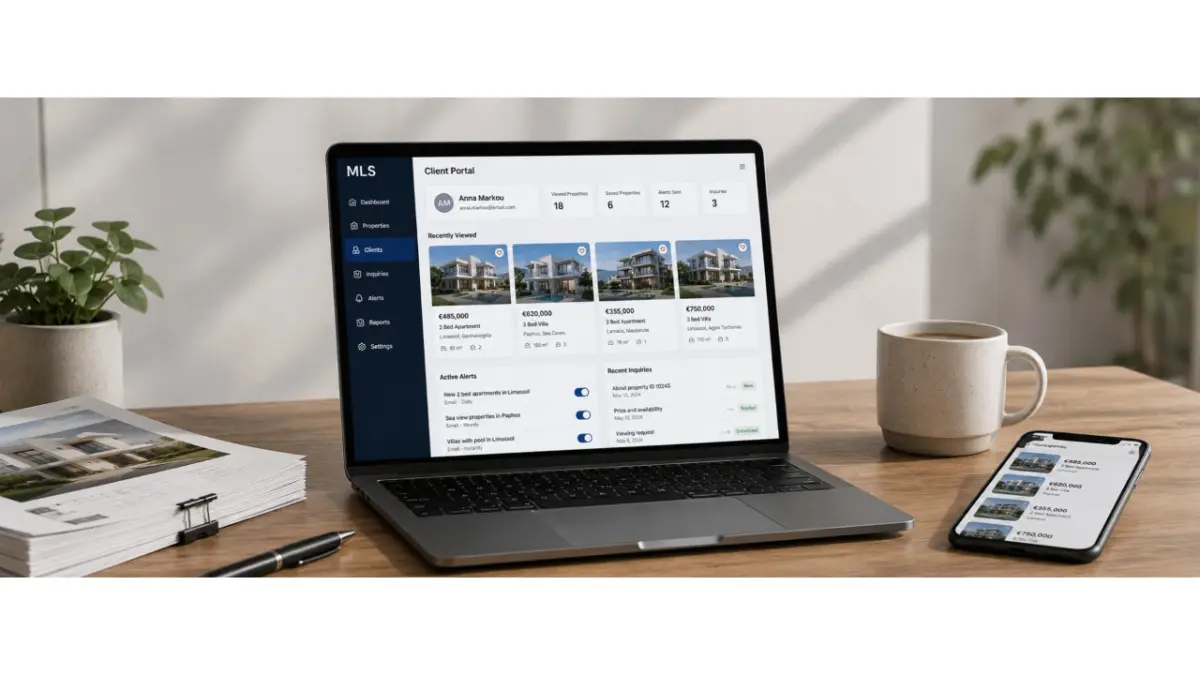
Client communication becomes harder to manage when every new interaction sits outside the system that holds the actual property data. The agent has to rebuild the context manually: which listing was already shared, what caught the client’s attention, where the question came from, and whether the information has changed since the last message. The more disconnected that process becomes, the higher the risk of delays, repeated follow-ups, or answers based on old details. In this workflow, a client portal MLS helps connect saved selections, client activity, alerts, and follow-up questions to the same working property record inside the MLS.
How private client access works
A client portal is a private space that an agent opens for a specific client. Inside it, the client can view relevant properties, return to previously viewed options, save listings that interest them, and leave feedback on a specific property card. For the agent, this matters because the client’s interest stays connected to the listing instead of disappearing into a separate conversation.
This makes the next conversation more precise. The agent can see which properties the client actually opened, which ones did not fit, and where a question appeared. Instead of restarting the discussion every time, the team works from a visible history of client activity.
Why a portal works better than manual sharing
When properties are shared manually, every new version creates room for confusion. A client may open an old link, return to a listing that has already changed status, or ask about a property that no longer matches the current information. The agent then has to check the data again, resend updates, and explain which version is now correct.
In a portal, the property stays connected to current MLS data. If the card is updated, the client is not working from an old file or an isolated message. They return to the version that belongs to the team’s live workflow. This is especially useful when several people are involved in the same client or property process.
A portal keeps the workflow clearer when the client returns to a listing days later, when the agent needs to understand what has already been viewed, when status or price changes after the first share, or when a client’s question relates to one specific property card.
How clients receive new matching options
When a suitable property appears in the system, the agent does not need to rebuild a selection manually every time. The platform can notify the client based on a saved search, so they see a new option or an important update faster. In these moments, listing alerts help protect the window when a relevant property becomes available or returns to the market.
For the Cyprus market, response speed matters. A client’s interest can be active for only a short period, and a delay of several hours may change the outcome. Automated alerts reduce the gap between an MLS update and the client’s next action.
How notifications reduce manual work
The team can set communication so the client receives updates without the agent repeating the same message by hand. When a new matching property appears, a status changes, or a price is updated, the system brings the client back to the right property card. In this process, push notifications MLS can be useful when quick attention matters and the client is more likely to react on their phone.
Email also remains a practical channel when a client wants to compare properties more carefully or return to a selection later. When email alerts listings are connected to current MLS data, the email does not become another outdated link from an old thread. It leads the client back to the current property card, where they can review the details and ask the agent a question.
How teams avoid losing client questions
In daily communication, a client’s question often appears away from the property itself. The agent may remember that something was asked, but not immediately see which listing it referred to, who needs to answer, or what information has already been sent. As the number of clients and properties grows, that context becomes difficult to manage by memory.
That is why property inquiries management should be connected to property cards, saved searches, and client actions. When a question comes through the portal, the team can immediately see which property it belongs to and what should happen next. This reduces the risk of missed messages and helps agents answer with context instead of searching through separate channels.
What the team manager can see
A manager needs more than the fact that inquiries exist. They need to see where a client is waiting, which properties are attracting interest, where response time is slowing down, and which questions repeat most often. When all of that stays inside private messages, the process is difficult to manage.
Inside the MLS, an inquiry dashboard MLS brings client inquiries, activity, and next actions into one working view. The manager can see which requests have been handled, where the next step is needed, and which clients require attention. For an agency or developer, this creates stronger control over communication quality.
Why this matters for real estate teams in Cyprus
In Cyprus, property communication often still depends on personal messages and manual checks. An agent may send a property, verify availability later, return with an update, and manage several similar requests at the same time. With one client, this can still be handled manually. With many active inquiries, the process quickly becomes unstable.
A client portal changes that route. The property, its current card, the client’s reaction, and the next question stay connected inside the MLS. The agent does not have to reconstruct the history from memory, the client does not need to ask for the same option again, and the manager can see how the team is handling interest.
How a portal supports deal speed
When communication is connected to current property data, the team can move from client interest to the next action faster. The client opens a property, saves it or asks a question, and the agent immediately sees the signal. If the information changes, the update does not remain buried in an old conversation. It becomes part of the working route.
For a real estate team, this reduces manual work and makes client communication more consistent. Instead of searching through messages, resending materials, and checking old links, the agent works from one space where the property, the client’s interest, and the team’s response are connected.
FAQ
What is a client portal in MLS?
A client portal is a private space where a client can view relevant properties, save options, leave feedback, and ask questions connected to specific property cards. For the team, it keeps communication close to current MLS data.
How is a portal different from sending regular property links?
A regular link can become outdated when the status, price, or availability changes. In a portal, the client returns to a property card connected to the MLS workflow, so the agent does not need to resend a new version every time.
Why do clients need property alerts?
Alerts help clients see new matching properties or important changes faster. This reduces the delay between an update inside the MLS and the client’s response.
How does a portal help the agent?
The agent can see which properties the client opened, saved, rejected, or asked about. That makes the next conversation more accurate and reduces repeated clarification.
Is a client portal useful for developers?
Yes. For developers working with external agents, brokers, or multiple client inquiries, a portal helps connect client interest with current property information and gives the team better control over communication.
Author
This material was written by Maria Vashchenko.
For questions, collaboration, or further discussion, feel free to contact me on LinkedIn.